Data & Analytics
Inside the Black Box of AI: How Data Labeling and Annotation Really Work
Aman Mundra · May 5, 2026 · 17 min read
Contents
- Introduction
- What Is Data Annotation?
- The Simple Definition
- Why do machines need labelling?
- What Does Annotation Actually Look Like?
- Annotation in Video, Robotics, and Autonomous Systems
- Video Annotation: Labeling Things That Move
- Robotics Annotation: Teaching a Machine to Touch the World
- Autonomous Systems Annotation: Stacking the Sensors
- Why Annotation Tools Matter
- Meet Label Studio
- Getting Started: The UI Flow
- Meet CVAT
- Head-to-Head Comparison
- Which Should You Use?
- Conclusion
- References & Further Reading
✍️ Co-Authors:
1. Tharindu Gunathunga
2. Hirunika Samarakoon
3. Aman Mundra
4. Sakshi Dhawan
Table of Contents

Introduction
What Is Data Annotation?
 The Simple Definition
 Why do machines need labeling?
 What Does Annotation Actually Look Like?
 Annotation in Video, Robotics, and Autonomous Systems
 Video Annotation: Labeling Things That Move
 Robotics Annotation: Teaching a Machine to Touch the World
 Autonomous Systems Annotation: Stacking the Sensors
 Why Annotation Tools Matter
Meet Label Studio
Meet CVAT
Head-to-Head Comparison
Which Should You Use?
Introduction
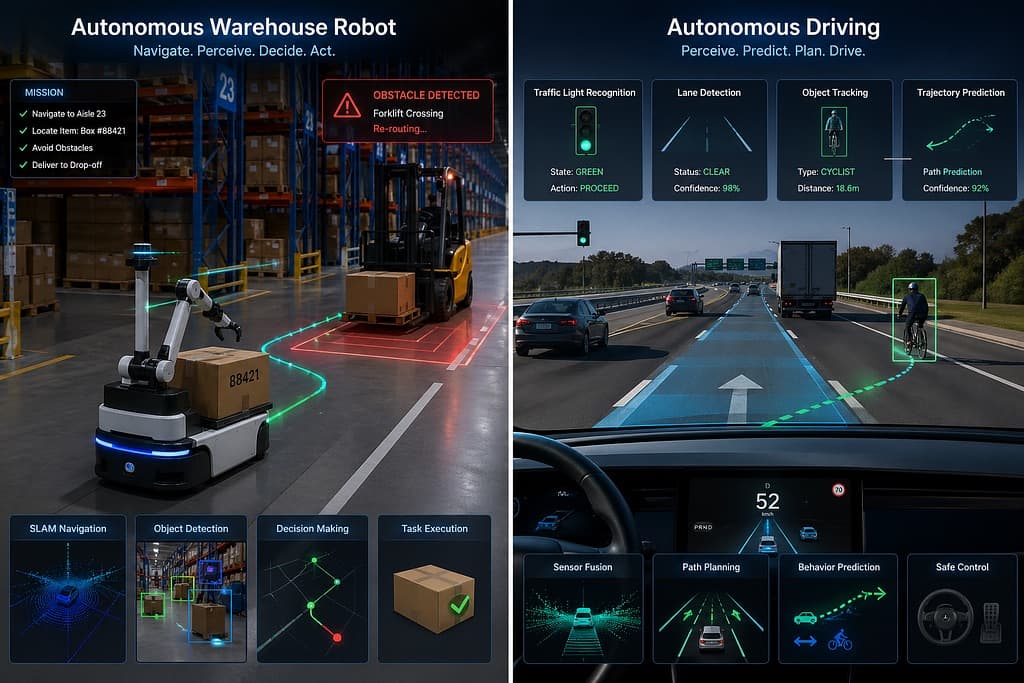
Imagine a self-driving car merging onto a highway, recognising traffic lights and predicting where a cyclist is heading next. Or a warehouse robot weaving between shelves, picking the right item - all without human guidance. These systems feel almost magical, but underneath all of it is something far less glamorous: millions of labeled images and video frames.
Modern robots and autonomous vehicles learn by example. You show a model thousands of images of pedestrians with boxes drawn around each one, and eventually it learns to detect them on its own. That process of drawing boxes, tracing outlines, and tagging objects is called data annotation, and it’s the backbone of every AI vision system in production today.
As autonomous systems have grown, annotation workload has grown with them. A single AV (Autonomous Vehicle) dataset can contain hundreds of thousands of frames, each needing precise labels. Doing that without the right tooling is simply not viable.
Label Studio and CVAT are two of the most widely adopted open-source options for teams building computer vision pipelines. They aren’t the same tool though, and picking the wrong one can cost you time. This post breaks down both clearly, from the ground up.
What Is Data Annotation?

Imagine you’re trying to teach a toddler the difference between a cat and a dog. You wouldn’t hand them a textbook on feline anatomy. Instead, you’d point at a cat and say “cat,” then point at a dog and say “dog,” over and over, until they figure out the pattern on their own. How would we point them out to machines or machine learning algorithms? The answer lies within Data Annotation.
The Simple Definition
Data annotation is the process of labelling raw data - pictures, videos, audio clips, sensor readings, text - so that a computer can learn from it. The labels are the “answer key” the machine studies to figure out how to recognize things on its own later.
If you’ve ever filled out one of those “select all the squares with a traffic light” CAPTCHAs, congratulations - you’ve done data annotation. Those clicks helped train the computer-vision systems behind self-driving cars and image search.
Why do machines need labelling?
A computer does not see a picture as we do. A picture of a dog is obviously a dog to us, but for a computer it’s just a grid of numbers describing the brightness and color of millions of tiny dots (pixels).
Annotation gives them a starting point. By showing labeled data thousands of times sometimes millions of times- the model gradually learns what patterns of pixels tend to mean “dog.”
What Does Annotation Actually Look Like?
The form annotation takes depends entirely on what you’re trying to teach the model.
Bounding boxes. You draw a rectangle around an object and tag what it is. It’s quick, simple, and the workhorse of object detection - the kind of labeling you’d use to teach a model “there’s a dog in this photo.”
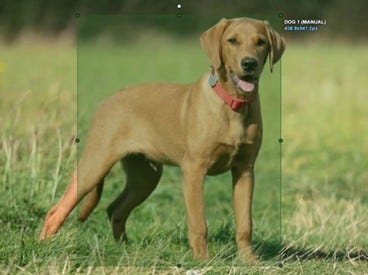
Polygons and segmentation masks. Instead of a rough rectangle, you trace the exact outline of the object. Pixel-level labeling like this is called semantic segmentation (every pixel gets a label, like “road,” “sky,” or “tree”) or instance segmentation (each individual object gets its own label, even when there are ten of the same type in the same picture).

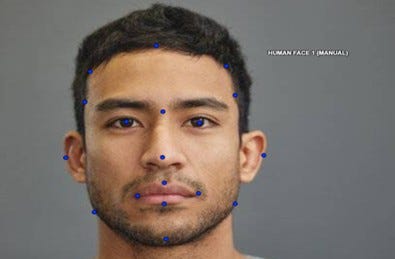
Keypoints and landmarks. You mark specific points on an object - the corners of a face, the joints in a body, the vertices of an item. This is what powers pose estimation, facial recognition, and applications that need to understand how something is shaped or positioned.
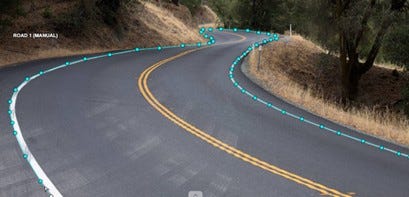
Polylines. A line, straight or curved drawn along something long and thin: a road lane, a wire, a crack in a wall. Useful when the “object” doesn’t really have an outline, just a path.
3D cuboids. Like bounding boxes, but in three dimensions. Used when you need to capture not just where an object is, but how far away it is and which way it’s facing..
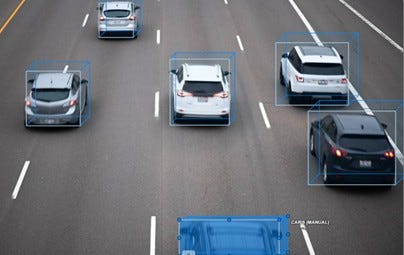
Classification labels. Sometimes you don’t need to point at part of an image, you just need to label the whole thing. “This photo contains a cat.” “This audio clip is in English.” “This document is a tax form.” Simple, but extremely common.

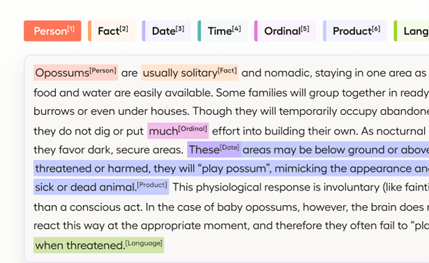
Text and Audio annotation. Annotation isn’t just for images. You might highlight names of people in a paragraph (named entity recognition), tag sections of a sentence by grammatical role, or transcribe spoken words into text with timestamps.
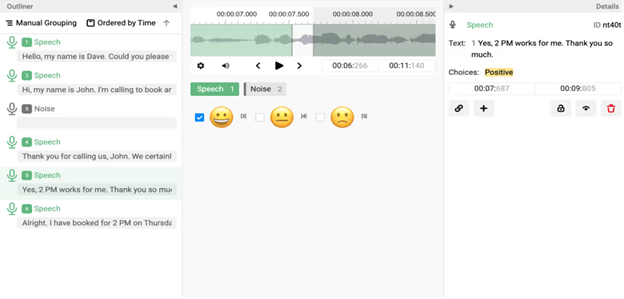
Temporal labels. When data has a time dimension - video, audio, sensor logs - you often label spans of time rather than single moments. “Between 0:32 and 0:41, the speaker is laughing.” “From frame 120 to frame 240, the car is turning left
These are the building blocks. Most real-world annotation projects mix several of them, and the right tool needs to handle whichever combination your project actually requires.
Annotation in Video, Robotics, and Autonomous Systems
So far we’ve talked about annotation in general. But the moment you step into the world of video, robotics, and self-driving cars, the game changes. The data is bigger, messier, and unforgiving in a way that simple image labeling never has to deal with. Let’s break each one down.
Video Annotation: Labeling Things That Move
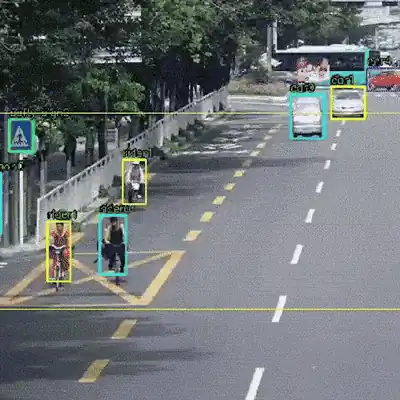
A photograph is a single moment frozen in time. A video is thousands of those moments in a row- 24 to 60 per second. That changes everything.
If you had a 10-minute video of a street scene. With 30 frames a second, there are 18,000 frames. You’d be crazy by frame 200 if you tried to label each image separately. But not only does the model need to know what’s in each frame; it needs to know that a red car in frame 1 is the same red car in frame 1,500, even if it gets partially obscured by a bus and reappears a few seconds later.
This is known as object tracking, and it’s a major challenge in video annotation. Humans and tools need to maintain a unique ID for each object over time, even when the object’s shape changes, it gets obscured, or disappears for a few frames. Fortunately, video annotation tools help by interpolating between keyframes you label the object every few frames, and the tool automatically fills in intermediate positions. Without this, video labeling is prohibitively expensive.
Then there’s the problem of video events and actions: not just “there’s a person” but “this person is walking” or “this person just fell down.” Action recognition labels span multiple frames and make video labeling even more complex.
Robotics Annotation: Teaching a Machine to Touch the World
A robot has to do more than see an object, it has to grab it. So the annotation needs to be more precise.
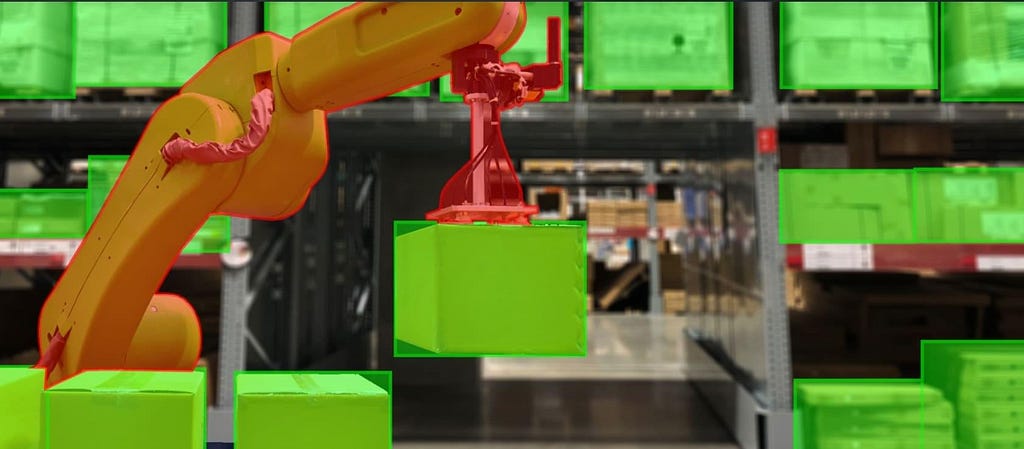
For example, a robot that picks products in a warehouse. To pick up a coffee mug, it has to know:
- Where the mug is in 3D space (not just in a 2D image).
- Which way it’s facing (the handle has to end up where the gripper expects it).
- Where exactly to grip it (the rim is bad, the side is good).
- How far it is from other objects so it doesn’t knock anything over.
Robotics annotation might involve 3D bounding boxes and 6-DoF poses (position + orientation of an object) to define placement, and grasp point labels to define where a robot can safely grip.
Another common approach is learning from demonstration - a human demonstrates a task, and that demonstration is annotated. These labels might be sub-steps of an action (“approach,” “grasp,” “lift,” “place”) or the human hand position at every frame. This is also called trajectory annotation, and it’s how many robot policies are learned today.
Autonomous Systems Annotation: Stacking the Sensors
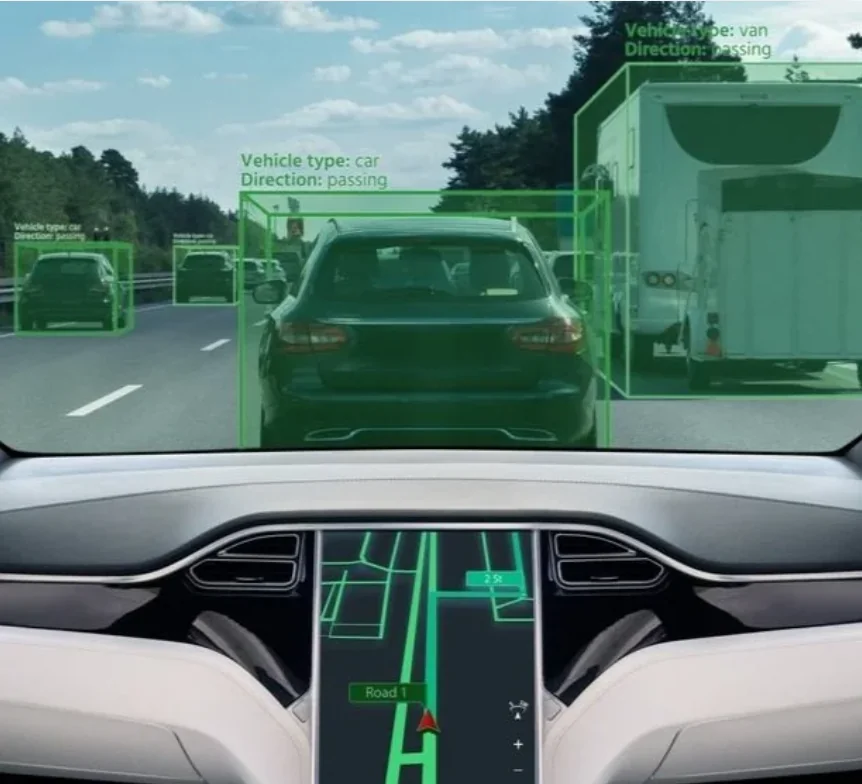
Autonomous vehicles and drones take all the challenges from video and robotics annotation - and add more. They don’t have one camera. An AV typically carries 6–12 cameras, multiple LiDAR sensors, radar, GPS, and inertial sensors - all operating simultaneously, all capturing data at different rates.
Labeling these data streams isn’t just about drawing boxes. It’s about tagging the same occurrence across multiple streams at once. A person crossing the street should be labeled in the front camera, the side camera, and be part of the same labeled cluster of points in the LiDAR scan at that exact moment. This is known as sensor fusion annotation, and it’s one of the most complex labeling tasks in the AI industry.
On top of that, autonomous datasets often need labels for things you wouldn’t think of as “objects” at all:
- Drivable space - the actual area of road the car can safely move through.
- Lane boundaries - including dashed lines, solid lines, merges, and fading paint.
- Traffic light states - not just “there’s a light,” but “it is currently green.”
- Trajectories and intent - where every nearby agent is likely to be a few seconds from now.
The volume is staggering. An AV can produce terabytes of data in a single day. No team annotates all of it. Today’s tools rely heavily on pre-annotation (the model makes an initial guess, and humans fix it) and active learning (the model surfaces only the most difficult examples for humans). Support for those workflows can be the difference between success and failure.
Why Annotation Tools Matter
At a small scale, you might get away with writing a quick script to draw bounding boxes or tag frames manually. But when your dataset grows, and in growing robotics and autonomous systems, that approach fails. Hand-labelling thousands of video frames in code is slow, inconsistent, and extremely easy to get wrong. One mislabeled frame won’t break a model, but thousands of them will.
This is exactly why dedicated annotation tools exist. They give you a clean visual interface to label data accurately, built-in workflows to manage large datasets across a team, and direct export to the formats your training pipeline expects - COCO, YOLO, Pascal VOC, and more.
The annotation tooling today splits broadly into:
- proprietary platforms (Scale AI, Labelbox)
- open-source options (Label Studio, CVAT).
For teams that need flexibility without licensing costs, especially in research and early-stage robotics projects, open-source tools are the practical choice. This post focuses on two of the most widely adopted open source ones: Label Studio and CVAT.
Meet Label Studio
Label Studio is an open-source data annotation platform built by Heartex, now part of HumanSignal. It was designed to provide multimodal support - you can annotate images, video, audio, text, time-series data, and even conversational data for NLP tasks, all within the same platform. For teams building multi-sensor AI systems, that flexibility is a major advantage.
Getting Started: The UI Flow
Setting up a project in Label Studio is straightforward. You create a project, define your labelling schema using a simple XML-based config.
Also they offer templates for common tasks then import your data. The labelling interface is clean and browser-based, so your team doesn’t need to install anything locally.
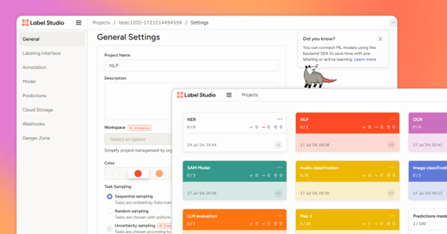
The workflow goes: Project setup → Import data → Label → Review → Export. Once labelling is done, you export directly to COCO, YOLO, Pascal VOC, or CSV - ready to plug into your training pipeline.

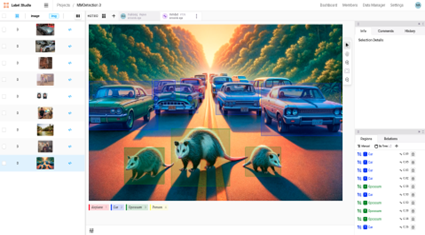
It Works Well for Robotics and Autonomous Vehicles
For robotics and AV applications, Label Studio covers several critical needs:
- Video frame annotation - step through video frame by frame and label objects across time
- Object tracking - maintain consistent IDs across frames so your model learns that the same car across 50 frames is still one car
- Sensor fusion support - label data from multiple sources side by side, useful when working with camera + LiDAR setups common in autonomous vehicles
The Standout Feature: ML-Assisted Pre-Labelling
Manually labeling thousands of video frames is exhausting. Label Studio’s ML backend integration lets you connect your own trained model.
Let’s say, a YOLOv8 detector, so the tool automatically pre-labels incoming data. Your annotators then just correct mistakes rather than starting from scratch.
On large datasets, this can dramatically cut labelling time.
Label Studio is versatile, but it has a notable gap for video-heavy workflows: it does not support frame interpolation.
Simply, this means if you have an object moving across 100 video frames, you have to manually label it in every single frame. There is no way to label frame 1 and frame 100 and let the tool automatically fill in the positions in between. For robotics and AV datasets where you’re often tracking vehicles, pedestrians, or robot arms across thousands of frames this can become a real bottleneck. It’s one area where CVAT has a clear edge.
Who Should Use Label Studio?
Label Studio is the right pick if your project spans multiple data types, you’re building a custom ML pipeline and need tight model integration, or your team is still early-stage and needs a flexible tool. It’s particularly strong when your robotics system pulls from more than just cameras - audio, text logs, or mixed-sensor data all fit naturally into one workflow.
Meet CVAT
CVAT (Computer Vision Annotation Tool) began as an internal project at Intel in 2017, built to accelerate the annotation of digital images and videos for training computer vision algorithms. Intel eventually open-sourced it, and it has since grown into one of the most widely used annotation platforms in the field - trusted by tens of thousands of users worldwide, with a self-sustaining open-source community and an independent company behind its continued development.
Where Label Studio optimizes for flexibility across data types, CVAT is single-mindedly focused on computer vision. That focus shows everywhere in the product.
Getting Started: The UI Flow
The workflow in CVAT is organized around Tasks and Jobs. You create a task, attach your images or video, define your label set, and the platform breaks the work into jobs that can be distributed across annotators. The interface is browser-based and can be run locally via Docker or used through the hosted cloud version - no heavy setup required for smaller teams.
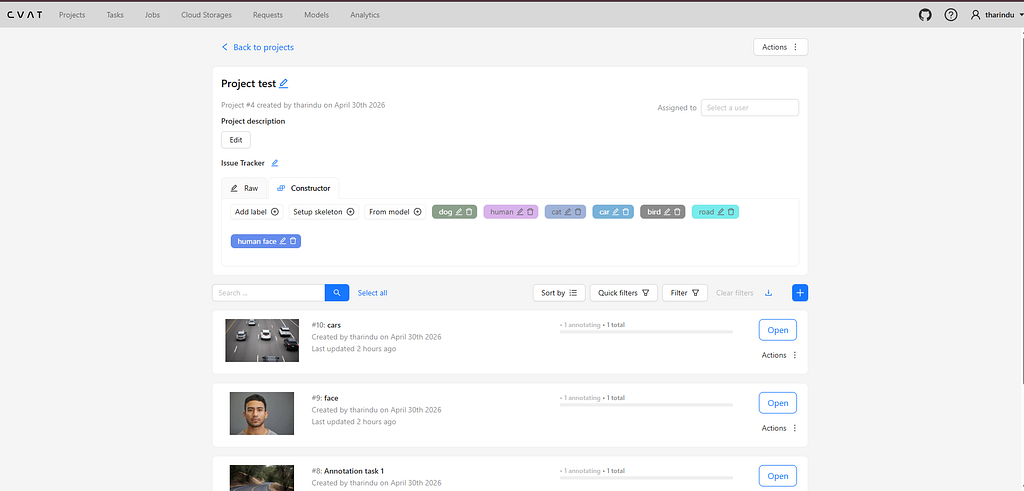
Once inside the annotation workspace, the toolset is built for CV work: rectangles, polygons, polylines, keypoints, ellipses, cuboids, and tags are all available out of the box. The experience is dense but purposeful every control is oriented around labelling images and video accurately and fast.
Where CVAT Pulls Ahead: Video and Tracking
This is where CVAT earns its reputation. For video annotation, CVAT supports interpolation - you label an object on frame 1, label it again on frame 30, and the tool fills in the positions for every frame in between. This applies to both bounding boxes and polygons, which covers the majority of real-world tracking tasks.
More importantly, CVAT handles track-level annotation natively. Every object you label in a video can be assigned a persistent ID that follows it across the entire sequence. This is the core primitive behind object tracking datasets - and it’s not an add-on feature here, it’s how the tool is fundamentally designed.
AI-Assisted Labelling
CVAT has deep integration with modern foundation models. It supports SAM 2 (Segment Anything Model 2), Meta AI’s model for real-time object segmentation in both images and video. In practice, this means you can click on an object in frame zero, run the SAM 2 Tracker, and have it propagate a segmentation mask across subsequent frames automatically , dramatically cutting the time spent on dense video labelling. YOLO-based auto-detection is also supported for single-frame pre-annotation.
Robotics and AV Relevance
CVAT supports 3D point cloud annotation, which is critical for autonomous driving and robotics applications that rely on LiDAR data. Combined with support for the KITTI export format - the standard used by major AV datasets like the KITTI Vision Benchmark Suite and nuScenes - CVAT fits naturally into autonomous vehicle data pipelines. For teams building perception stacks for self-driving cars or outdoor robotics, this isn’t a nice-to-have; it’s a requirement.
Ideal for: Teams doing heavy video annotation, object tracking, AV perception datasets, or any project where the primary output is a computer vision model trained on labeled video or LiDAR data.
Head-to-Head Comparison
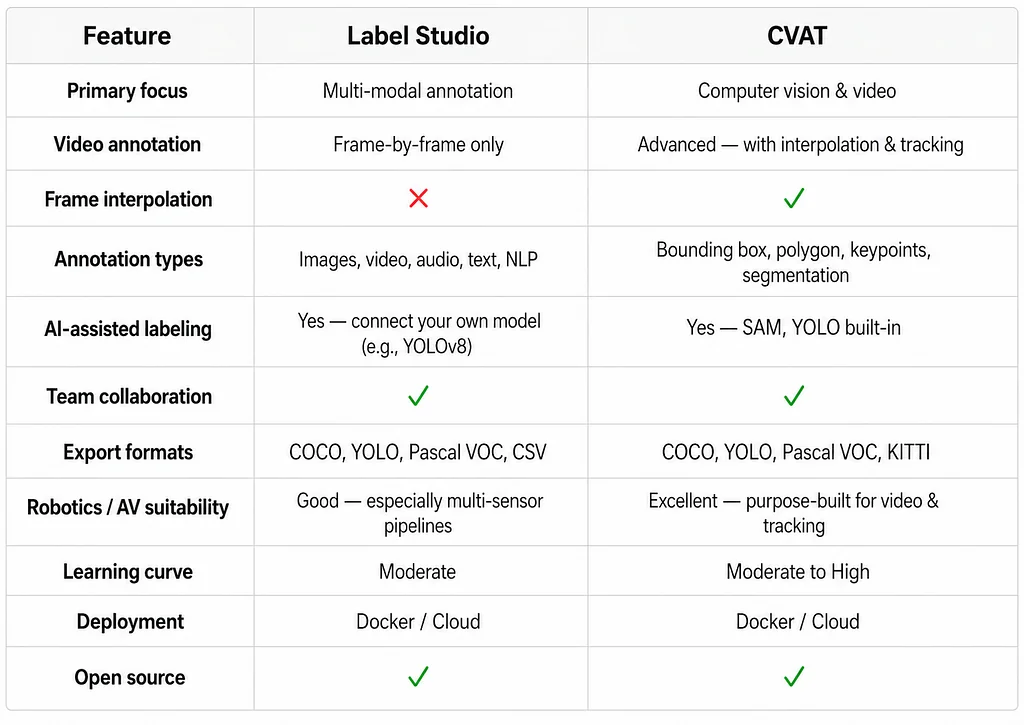
Both tools are production-ready and free to use, but they clearly serve different strengths.
Which Should You Use?
The short answer is: it depends on the type of data you have.
Use Label Studio if your pipeline involves multiple data modes - images and audio, sensor data, or text - or if you want to inject your own models into the labelling pipeline. Its dynamic schema and wide range of supported data formats make it a better choice for a multi-modal/hackathon-style pipeline where you’re still experimenting with what the pipeline does.
Pick CVAT if you’re working with video. If you’re tracking objects in video, creating AV perception datasets in the KITTI format, or segmenting LiDAR point clouds, CVAT has the tools for you. CVAT will help, where Label Studio will hinder.
Consider running both. They aren’t mutually exclusive. A workflow that works for large teams: consider Label Studio as the team data management and multi-modal console, and use CVAT to handle most video tasks with its tracking and interpolation capabilities. You now have the best of both worlds: organizational for one, CV for the other.
Conclusion
Data annotation is invisible infrastructure. It is not used in product pitches, but without it, robots do not pick boxes, cars do not read lanes, and drones do not avoid obstacles. It is the unsung hero of every AI computer vision system.
The Challenges No One Talks About
Building a good labeled dataset is harder than it looks. A few challenges that consistently slow teams down:
- Consistency at scale - When multiple annotators label the same object differently, your model learns inconsistency. Maintaining clear guidelines and regular review cycles is non-negotiable.
- Video annotation fatigue - Frame-by-frame labeling across hours of footage is mentally exhausting. Without interpolation or AI-assist, quality degrades fast as fatigue sets in.
- Edge cases - Real-world footage is messy: partially visible pedestrians, night-time driving, motion blur. These are exactly the frames your model needs labeled most, and they’re the hardest to label correctly.
Why this matters more than ever
AI is no longer a research curiosity - it’s being deployed in hospitals, on public roads, and inside warehouses. The demand for high-quality labeled data is growing faster than the tooling can keep up with. According to industry projections, the data annotation market is expected to reach tens of billions of dollars by the end of this decade, driven almost entirely by autonomous systems, robotics, and computer vision applications. The teams that build strong annotation pipelines now will have a compounding advantage as model complexity grows.
This is also where Human-in-the-Loop (HiTL) becomes critical. Rather than labeling everything upfront and training once, HiTL systems keep humans actively in the loop - the model flags uncertain predictions, a human corrects them, and the model retrains. Tools like Label Studio and CVAT are increasingly being used not just for initial dataset creation, but as live correction interfaces inside HiTL pipelines. It’s a shift from annotation as a one-time task to annotation as an ongoing process.
The Road Ahead
There is no one right choice between Label Studio and CVAT. Label Studio is wide, CVAT is narrow. The decision on whether to use both comes down to understanding your data and where your pipeline will bottleneck.
What’s undeniable is that the tools are changing rapidly. Foundation model embeddings, AI-assisted labelling, and automated tracking are turning weeks of annotation time into days. As autonomous systems grow more sophisticated and datasets scale up, the teams that build the right labelling foundation will spend less time annotating and more time building.
Up next: We’ve talked about humans labelling data for models. But what about humans giving feedback on model outputs to make them better? That’s the idea behind Reinforcement Learning from Human Feedback (RLHF) - the technique behind some of the most capable AI systems today. We’ll break it down in next week’s post.
References & Further Reading
- Label Studio docs -https://labelstud.io/guide/
- CVAT GitHub - https://github.com/cvat-ai/cvat
- CVAT docs - https://docs.cvat.ai/docs/
- COCO dataset format - https://docs.ultralytics.com/datasets/detect/coco/
- Video Support - https://www.annotationsupport.com/services/video-annotation.php
- Robotics/AV datasets
- nuScenes dataset - https://www.nuscenes.org/
- KITTI dataset- https://www.cvlibs.net/datasets/kitti/
- Digital divide Data: https://www.digitaldividedata.com/blog/video-annotation-for-autonomous-driving
Originally published on the Welzin Medium.