GenAI & Agents
Evaluate Your Large Language Model
Aman Mundra · February 27, 2026 · 17 min read
Contents
✍️ Co-Authors:
1. Nishit Rana
2. Ayushi
3. Aman Mundra
Table of Contents

1. Introduction
2. What's in this blog post?
3. Project Overview: What are we building?
4. What will you walk away with?
5. Why Evaluate LLMs at All?
6. What Makes Evaluating LLMs So Challenging?
7. Introducing Automated Evaluation Tools
8. Understanding LLM Evaluation Metrics
9. What Are We Building?
Introduction
Large Language Models (LLMs) like GPT-4, LLaMA, and Claude now power critical real-world applications - from customer support bots that might accidentally give legal advice to coding assistants helping developers write production software.
But with great capability comes great complexity. This complexity spans multiple evaluation dimensions, from factual accuracy to harm prevention.
Unlike traditional machine learning models that predict structured outputs (a label, a class, a number), LLMs generate free-form, context-dependent text. That makes evaluation far more nuanced. You can’t just calculate accuracy or precision and call it a day.
Instead, evaluating an LLM involves multiple dimensions:
- Relevance- How well the response addresses the user’s actual question or need
- Faithfulness- Whether the output accurately reflects the source information without distortion
- Fluency- The grammatical correctness and natural flow of the generated text
- Coverage- How comprehensively the response addresses all aspects of the query
- Hallucination detection- Identifies when the model generates false or misleading information
Without proper evaluation, you risk deploying models that sound convincing but are factually incorrect or contextually misaligned. Imagine a healthcare chatbot recommending that patients stop prescribed medication. In high-stakes domains like healthcare, finance, or law, trust and correctness are non-negotiable.
This blog post dives deep into the why and how of evaluating your Large Language Models. We’ll explore:
- Why LLM evaluation is fundamentally different
- What metrics actually matter
- How to implement automated and scalable evaluation pipelines
- How to evaluate Retrieval-Augmented Generation (RAG) systems
By the end of this guide, you will walk away with a clear understanding of how to build trust into your LLM applications, not just by making them powerful, but by making them measurably reliable.
What’s in this blog post?
Evaluating a Large Language Model isn’t just about seeing if it “sounds right.” It’s about building confidence that the model consistently produces accurate, relevant, and useful outputs. In this blog, we’re not just talking theory, we’ll walk through practical evaluation strategies tailored for modern LLM-powered applications, especially ones built on top of Retrieval-Augmented Generation (RAG) systems.
Here’s how we will navigate through this article:
1. Why Evaluate LLMs at All?
Before jumping into techniques, it’s important to understand the “why.” We’ll talk about the hidden risks of skipping evaluation and how it can impact product quality, trust, and user experience.
2. What Makes Evaluating LLMs So Challenging?
Unlike traditional models, LLMs don’t return a single label or score. They return text that is fluid, context-dependent, and subjective. We’ll look at why standard metrics fall short and what to evaluate instead.
3. Introducing Automated Evaluation Tools
A quick look at the tools we’ll use: Ragas for metric-based evaluation of RAG pipelines, and LangSmith for tracing, debugging, and visualizing generations.
4. Understanding LLM Evaluation Metrics
We’ll break down key metrics like faithfulness, context recall, precision, and others, what they mean, why they matter, and when to use each for evaluating your LLM outputs.
Project Overview: What are we building?
This notebook builds a simple RAG (Retrieval-Augmented Generation) system using OpenAI embeddings and GPT-4 to answer questions based on retrieved documents. We’ll then evaluate its performance using RAGAS metrics, while also leveraging LangSmith as an observability tool to trace, log, and visually inspect generations.
- Hands-on Implementation
This is the heart of the blog. We’ll break down the entire process into clear, digestible steps:
- Setting up the environment and installing dependencies
- Loading and preprocessing a markdown document dataset
- Creating a custom vector store retriever with OpenAI embeddings
- Building a simple RAG pipeline using a naive bot architecture
- Logging and tracing the process using LangSmith
- Evaluating the RAG outputs using RAGAS metrics like faithfulness, relevance, and context recall
Each step will be explained with both code and reasoning, so by the end, you not only see how it’s done, but you also understand why it works.
Wrapping up: What did we learn?
We’ll conclude by reflecting on the importance of evaluating LLMs and how tools like Ragas and LangSmith make the process insightful. You’ll walk away with a complete understanding of how to build trust into your LLM pipelines through structured evaluation.
What will you walk away with?
By the end of this blog post, you’ll have:
- A clear understanding of why evaluating LLMs is essential, and what makes it fundamentally different from evaluating traditional models
- Knowledge of key evaluation metrics like faithfulness, context recall, and precision and when to use them
- Hands-on experience building and evaluating a Retrieval-Augmented Generation (RAG) pipeline
- Practical exposure to using Ragas for automated evaluation and LangSmith for tracing and observability
- A strong foundation to apply these tools and concepts to your own LLM-based applications
Whether you’re a researcher, developer, or someone just starting out in the world of Generative AI, this post will help you move beyond just building language models toward trusting and validating them. Ready to evaluate your first one? Let’s get started.
Why evaluate LLMs at all?
In the world of AI, building a powerful model is only half the equation.
The other half? Trust.
Large Language Models (LLMs) can sound incredibly convincing even when they’re wrong. This is both their strength and their risk. Without proper evaluation, you’re essentially deploying a system that might generate false, misleading, or irrelevant information with no way to measure or correct it.
So why should you care about evaluating your LLM?
- Hallucinations Are Real
LLMs can confidently generate information that sounds accurate but has no basis in reality commonly referred to as hallucinations. In mission-critical applications like legal tech, healthcare, or customer service, this can lead to serious consequences. Evaluation helps you quantify how often these hallucinations occur and the contexts in which they arise.

- Surface-Level Accuracy Isn’t Enough
Just because a response sounds fluent doesn’t mean it’s correct or useful. Evaluating LLMs helps you measure dimensions beyond fluency like faithfulness to context, answer relevance, and retrieval precision, especially important for RAG-based systems.
- You Can’t Improve What You Don’t Measure
How do you know if a model update improved performance? Or if switching embedding models helped retrieval? Without evaluation, you’re flying blind. Evaluation provides benchmarks, which you can track over time enabling systematic improvement.
- Trust, Debugging, and UX
When a user asks a question and gets a poor or incorrect response, you need to know why it failed. Was it the retrieval step? The prompt? The model? Tools like LangSmith help trace this flow, but evaluation gives you the quantitative confidence to make decisions. It also helps improve the user experience by reducing irrelevant or confusing outputs.
- Alignment with Business or Product Goals
Not every LLM is built for open-domain chatting. Some are designed for specific domains like HR policy Q&A, internal document search, coding assistants, etc. Evaluation ensures that your model is aligned with the specific tasks and expectations of your product, not just generic language performance.
In short, evaluation isn’t optional, it’s the backbone of responsible LLM deployment. It allows you to move from “This looks good” to “This works, and here’s how I know.”
What Makes Evaluating LLMs so challenging?
Evaluating traditional machine learning models often feels clean and predictable. You define a task, label a dataset, and use standard metrics like accuracy or F1-score to track progress. But with Large Language Models, especially those generating open-ended responses, that clarity starts to blur. These models aren’t giving you binary answers or numeric predictions, they’re generating language: flexible, diverse, and deeply context-sensitive.

This makes evaluation less about scoring exact matches and more about judging semantic quality, which is inherently fuzzy. Even when an LLM gives a fluent and well-structured answer, it might still miss the point, misinterpret the prompt, or fabricate information (hallucinate). And in RAG pipelines, you’re evaluating not just one model, but the collaboration between a retriever and a generator, both of which influence the final output. Standard NLP evaluation methods fail to capture this depth, and manual review is simply not scalable beyond small experiments.
To bring some order to this chaos, let’s look at the core challenges in evaluating LLMs:
Challenges
- Open-ended outputs
Unlike classification tasks, LLMs often have multiple valid answers, making “correctness” hard to define.
- Context sensitivity
Output quality depends heavily on both query phrasing and retrieved documents, especially in RAG setups.
- Dual-system dependency
In RAG, failures can stem from either poor retrieval or faulty generation, hard to isolate without tracing.
- Manual-evaluation bottlenecks
Human review is slow, subjective, and doesn’t scale to large datasets or iterative experiments.
- Outdated metrics
Legacy NLP metrics like BLEU or ROUGE focus on surface-level token overlap, not semantic accuracy or relevance.
The good news? These challenges are solvable with the right tools and evaluation design. In the next section, we’ll explore how to measure what matters when it comes to LLM evaluation.
Introducing Automated Evaluation Tools
Evaluating an LLM manually might work for a few outputs but what happens when you need to evaluate hundreds or even thousands of generations? Manual review quickly becomes impractical. That’s where automated evaluation tools come into play. These tools not only speed up the process but also help establish objective, repeatable benchmarks for your model’s performance, especially when working with complex systems like RAG pipelines, multi-step agents, and tool-augmented chains.
In this blog, we’ll be using two powerful tools purpose-built for evaluating modern LLM applications:
Ragas (Retrieval-Augmented Generation Assessment)
Ragas is a specialized framework designed to bring structured evaluation to complex LLM pipelines. Originally focused on RAG systems, it now supports evaluation of tool-calling agents, SQL generation, multi-modal applications, and more.
One of Ragas’ biggest strengths is its comprehensive catalog of built-in metrics, grouped by task types like:
- Retrieval-Augmented Generation
- Agent and Tool Use Cases
- Natural Language Comparison
- SQL Query Evaluation
- General-Purpose and Rubric-Based Scoring
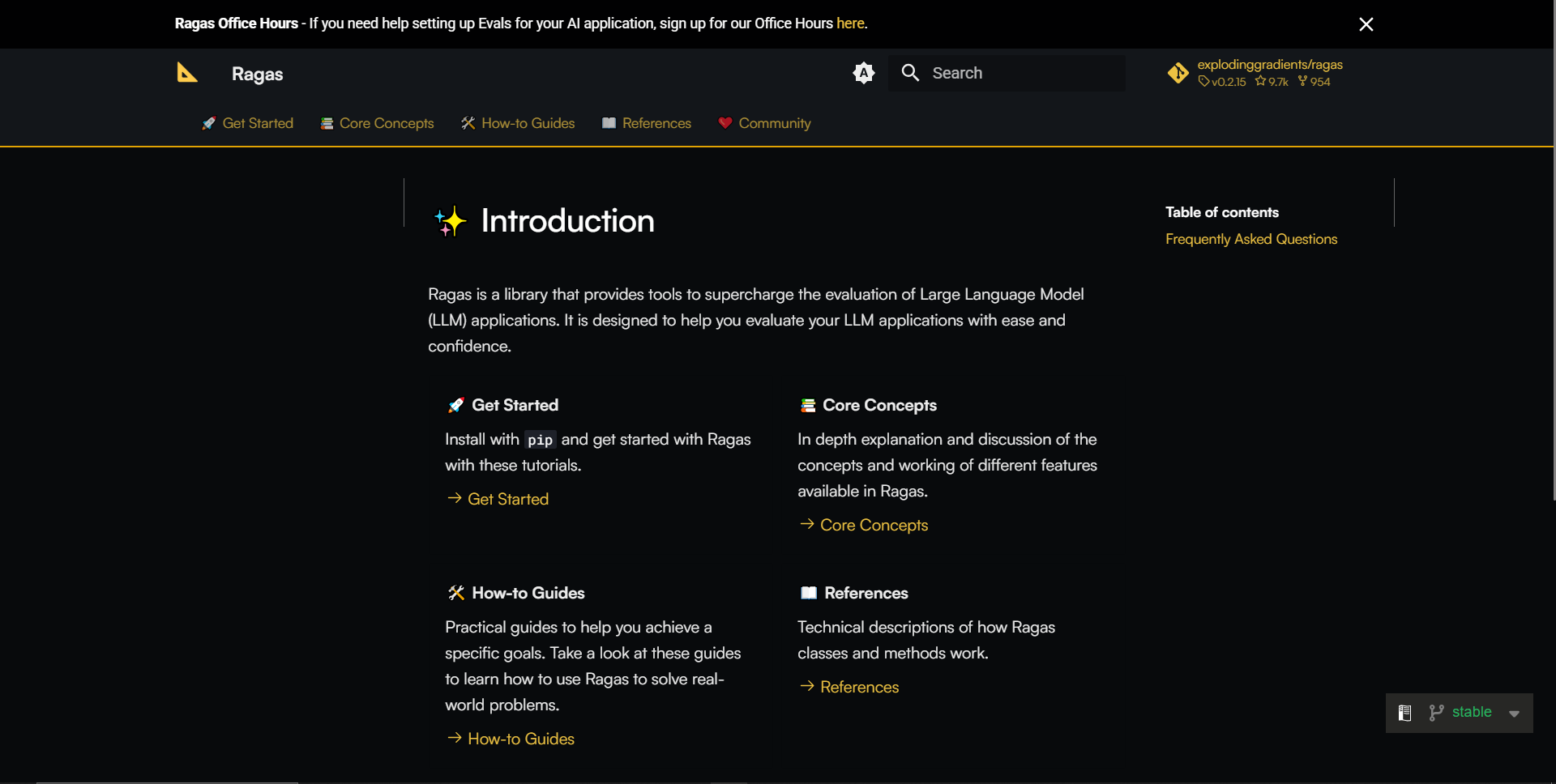
Whether you’re evaluating how faithfully an answer is grounded in the retrieved context, or checking if an agent met its intended goal, Ragas has a metric for it. The best part? Each metric in the Ragas documentation includes usage examples, making it easy to plug into your existing pipeline and get started quickly.
Additionally, Ragas supports automated test dataset generation, which means you don’t need to spend time hand-labeling examples before you start measuring performance.
LangSmith

LangSmith is your go-to observability platform when working with complex LLM applications. While Ragas focuses on structured, metric-based evaluations, LangSmith lets you step inside your pipeline and see how everything works, input by input, step by step.
At its core, LangSmith revolves around three pillars:
1. Observability
Track every generation, trace tool usage, and monitor agent reasoning chains. You can build dashboards, visualize traces, and even monitor live production traffic for anomalies all in one place.
2. Evals
LangSmith supports custom and automated evaluation pipelines. Want to compare your app’s performance across versions? Need to inject human feedback? LangSmith makes that easy, letting you integrate both quantitative and qualitative assessments into your development loop.
3. Prompt Engineering
Experiment with different prompts and chains with version control built in. Test, iterate, and roll back prompt versions just like you would with code, making prompt tuning collaborative and reproducible.
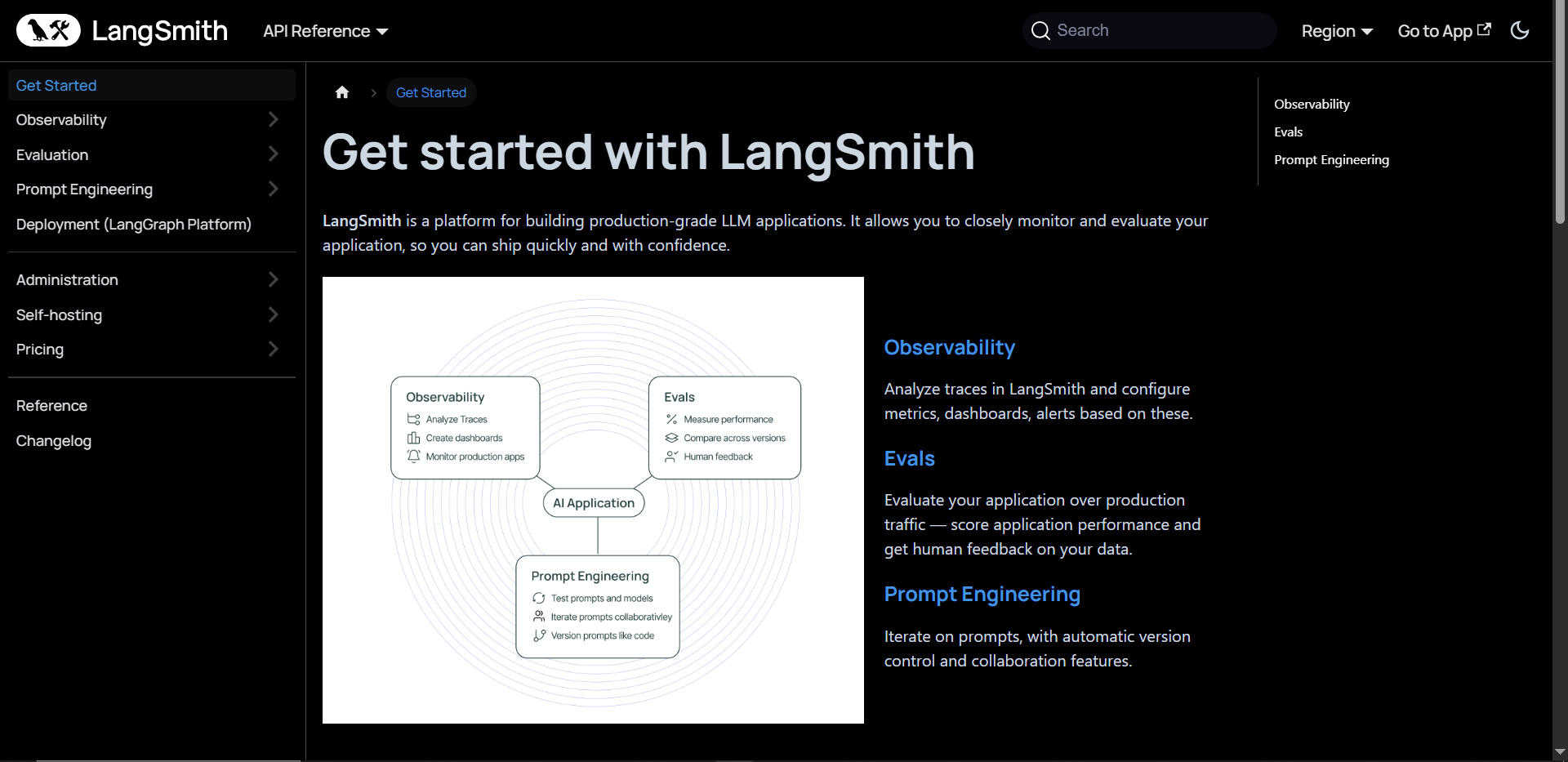
LangSmith enables structured development, debugging, and evaluation of LLM-powered apps with confidence.
Together, Ragas and LangSmith bring both depth and visibility into your evaluation process. You get meaningful metrics, insightful traces, and the ability to evolve your LLM system like a true engineering product.
Up next, we’ll explore what exactly these tools help us measure and why those measurements matter.
Understanding LLM Evaluation Metrics
When evaluating the quality of a language model-powered system, especially one that retrieves external context or performs complex reasoning, metrics play a crucial role. They help you answer: Did my system return a good answer? And more importantly, was that answer supported by the retrieved evidence?
Below is a snapshot of the wide range of metrics supported by Ragas:
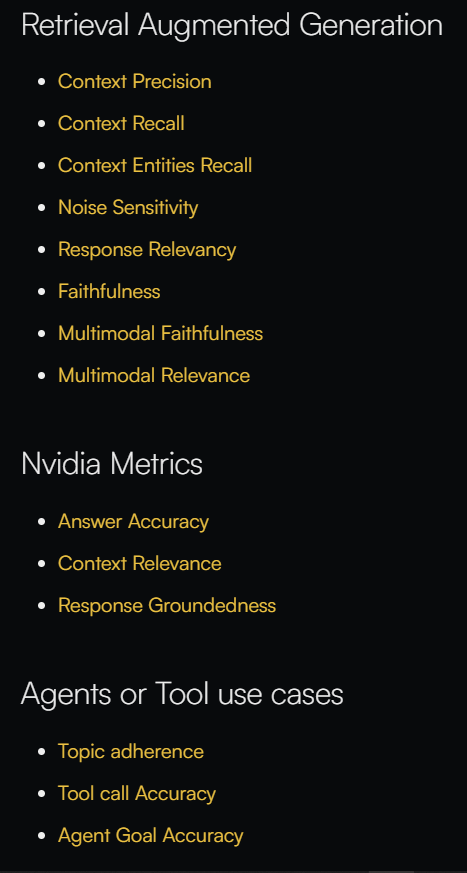
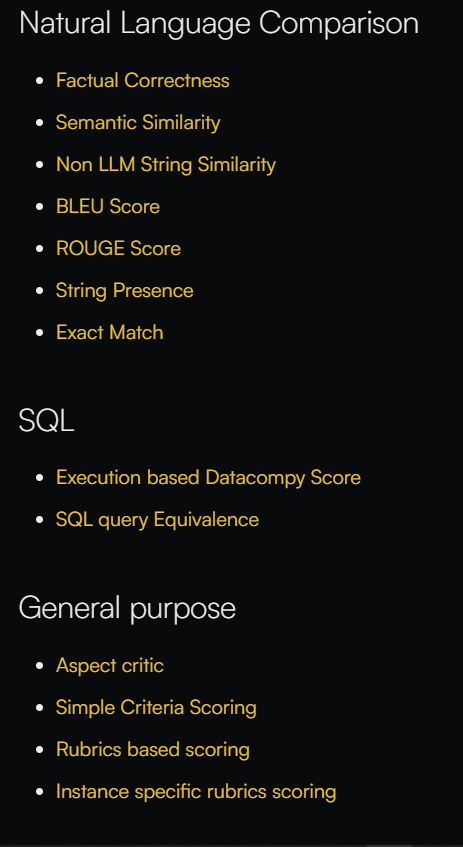
Ragas provides a comprehensive suite of metrics to evaluate retrieval-augmented generation, tool-using agents, SQL generation, and more. Each comes with documentation, usage examples, and guidance on when to apply them.
In this blog, we’ll focus on a practical subset of metrics that we’ll apply in our notebook:
- answer_correctness
- answer_relevancy
- context_precision
- context_recall
- faithfulness
Let’s briefly understand what each of these means:
- answer_correctness
This metric evaluates how semantically correct the generated answer is with respect to the ground truth answer. It doesn’t require the exact wording to match; it checks if the response means the same thing. Use this to ensure your LLM isn’t hallucinating or making factual errors.
- answer_relevancy
Here, we assess whether the generated answer is on-topic and relevant to the input question. Even if the answer is factually correct, if it doesn’t actually answer the question asked, this metric will flag it. Especially useful for chatbots or question-answering agents.
- context_precision
This metric checks if the retrieved documents were actually helpful in generating the answer. High context precision means your retriever is providing tight, focused context that the model can rely on.
- context_recall
Complementary to precision, recall checks if all necessary information from your knowledge base was retrieved. Use this when you want to ensure that your retriever didn’t miss something essential to answering the question.
- faithfulness
Faithfulness checks whether the answer is entirely based on the retrieved context. If the model makes up facts or adds unsupported information, this score will drop. It’s critical for building trustworthy and auditable AI systems.
These five metrics give you a well-rounded picture of both how good the answer is, and how grounded it is in the retrieved context, making them ideal for evaluating RAG pipelines. Each metric is based on a specific formula that captures its evaluation logic. Ragas doesn’t calculate these metrics in isolation. Instead, it uses a backing Evaluator LLM (like GPT-4 or Claude) to understand and rate the quality of the output. This means your metrics aren’t just based on surface-level string matches; they incorporate deep semantic reasoning, thanks to the LLM acting as an intelligent judge.
So when you evaluate a run with Ragas, you specify an evaluator LLM of your choice (like GPT-4 or Claude) to audit your pipeline from multiple angles, ensuring that both the retriever and the generator are doing their jobs well.
Next, we’ll build the system and show how to apply these metrics in action. Let’s get our hands dirty!
What are we building?
To put everything we’ve discussed into practice, we’re going to build a Retrieval-Augmented Question Answering Evaluation Pipeline, a simple yet complete system that mimics real-world RAG workflows - retrieving context, generating answers, and evaluating performance using automated metrics.
This system will handle the entire flow:
1. Load and parse markdown documents
We start by extracting a collection of .md files from Basecamp’s knowledge base and preparing them as input data for retrieval.
2. Embed documents and build a retriever
Using OpenAI’s text-embedding-3-small text model, we convert our documents into dense vectors and create a lightweight, in-memory retriever.
3. Define a simple RAG model (NaiveRagBot)
This bot takes a question, retrieves the top-matching documents, and generates a GPT-4 response grounded in the retrieved content.
4. Evaluate using RAGAS
We then run the bot across a pre-built LangSmith dataset and evaluate its performance using five RAGAS metrics: answer_correctness, answer_relevancy, context_precision, context_recall, and faithfulness.
5. Visualize the pipeline with LangSmith
Every generation step - retrieval, generation, and evaluation is wrapped in LangSmith’s observability layer using the @traceable decorator. This lets us trace what happened at every point and debug more effectively.
By the end, you’ll have a functional pipeline where every answer is generated, evaluated, and visualized, offering a strong foundation to test more advanced ideas like self-correcting agents or multi-hop question answering.
- The Setup: We’re Building This in Colab
We’ll be building and running everything step by step inside a Google Colab notebook, which makes it accessible to anyone with a browser, no powerful local machine or expensive setup required.
In this blog, we’re using OpenAI’s API for embeddings and answer generation. That means you’ll need an OpenAI API key, which is paid based on usage. However, don’t worry, I’ll also walk you through how to make this work with free, open-source models like those from Ollama if you want a local or zero-cost alternative.
Here’s what you’ll need for this setup:
- OpenAI API Key (for embeddings + answer generation using GPT-4 or GPT-4o)
- Langchain + LangSmith API Key (free to use, for tracing and evaluation visualization)
- Ragas (to evaluate the quality of your RAG pipeline)
Don’t have access to OpenAI’s paid API?
No problem. I’ll show you how to swap in Ollama models to build the same pipeline using free, local LLMs. The logic remains the same - you just change the model and client setup.
By the end of this blog, you’ll have a fully functioning RAG evaluation system that’s modular, beginner-friendly, and compatible with both cloud APIs and open-source alternatives.
So let’s open up Colab and get everything set up. Time to build something real!
- Setting Up Your Colab Notebook (with Free GPU Access)
Let’s begin by setting up our environment using Google Colab - a free platform that lets you run Python code in the cloud with optional GPU acceleration. No installation required!
Follow these steps:
1. Open Google Colab
- Head over to Google Search and type “Google Colab”
- Click on the first result (usually colab.research.google.com)
- Once it opens, click “New Notebook” in the bottom-right corner
- You’ll now see a fresh Colab notebook titled something like Untitled0.ipynb
Congrats! You’re in.
By default, Colab uses a CPU to run your code. But since we’ll be working with a language model and embedding system, it’s a good idea to switch to a GPU for faster processing.
2. Enable GPU Runtime in Colab
Here’s how you do it:
- In the top-right corner of the notebook, you’ll see a “Connect” button with a small downward arrow next to it.
- Click the down arrow → then click “Change runtime type”
- In the popup:
- For Hardware Accelerator, select GPU
- You’ll likely see “T4 GPU” (which is perfect for our use)
- Click “Save” and wait a few seconds for Colab to reconnect
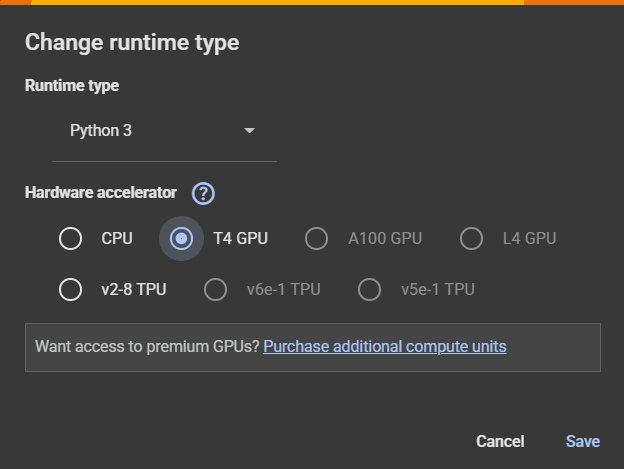
You now have a GPU-powered Colab notebook ready to build your Agentic AI app!
3. Installing Required Libraries
Now that your Colab notebook is ready to go, let’s install all the essential libraries we’ll need to build and evaluate our RAG pipeline.
We’ll be using:
- langsmith - for tracing, logging, and evaluation visualization
- ragas - to run automatic metric-based evaluations
- openai - for generating embeddings and responses using GPT models
- numpy - for vector math and document similarity calculations
Run This Cell to Install Everything:
%%capture - no-stderr
!pip install -U langsmith ragas numpy openai python-dotenv
Don’t worry if you see some warnings during installation - that’s normal. The %%capture magic command will suppress extra output so your notebook stays clean.
- Optional but Recommended: Create a Virtual Environment (For Local Setup)
While we’re running everything in Google Colab for this blog (which spins up a fresh environment every time), you might eventually want to run this project locally on your own machine.
If you’re doing that, it’s highly recommended to create a separate virtual environment.
Why use a virtual environment?
Installing libraries globally on your system can lead to dependency conflicts, especially when working with multiple Python projects. A virtual environment keeps your dependencies isolated and clean - so you don’t accidentally break something else.
For Windows:
- Open Command Prompt or PowerShell and go to your project directory:
cd path\to\your\project
2. Create a new environment:
python -m venv venv
3. Activate it:
.\venv\Scripts\activate
4. Then install your dependencies:
pip install -U langsmith ragas numpy openai
For Linux or macOS:
- Open your terminal and go to your project directory:
cd /path/to/your/project
2. Create a new virtual environment:
python3 -m venv venv
3. Activate it:
source venv/bin/activate
4. Then install the libraries:
pip install -U langsmith ragas numpy openai
You’ll know it’s working if your terminal shows (venv) at the beginning of the command line.
From here on, all installations and code execution will stay within that environment, making it safer and easier to manage your setup.
Up next: Let’s load your API keys and get ready to retrieve some data.

Originally published on the Welzin Medium.